
2021年8月6日 星期五
Ping
Ping的返回訊息有:
Request Timed Out:這個訊息表示對方主機可以到達到TIME OUT,這種情況通常是為對方拒絕接收你發給它的數據包造成數據包丟失。大多數的原因可能是對方裝有防火牆或已下線。
Destination host Unreachable:這個訊息表示對方主機不存在或者沒有跟對方建立連線。這裡要說明一下"destination host unreachable"和"time out"的區別,如果所經過的路由器的路由表中具有到達目標的路由,而目標因為其它原因不可到達,這時候會出現"time out",如果路由表中連到達目標的路由都沒有,那就會出現"destination host unreachable"。
Bad IP address:這個訊息表示你可能沒有連線到DNS伺服器所以無法解析這個IP位址,也可能是IP位址不存在。
Source quench received:訊息比較特殊,它出現的機率很少。它表示對方或中途的伺服器繁忙無法回應。
所以:
Request time out:當所經過的路由器的路由表中具有到達目標的路由(理論上可達),但是卻一直沒收到設備的回應,這時候會出現"Request time out"。也就是你ping傳送的封包理論上是能送達對方,卻沒收到回應的封包,有可能的障礙是:防火牆、設定不回應、回應的封包丟失(相關網路設定錯誤)等。(路是通的,只是沒回應)
Destination host unreachable:當路由表中連到達目標的路由都沒有時,ping這個設備就會出現"Destination host unreachable"。也就是:router上沒有到達對方的路徑資訊,不 知道在哪裡,封包該往哪裡送。(找不到抵達對方的路)
不管是Destination host unreachable 和 Request time out可能原因都有很多,還有待整理和釐清。
Destination Host Unreachable
This message indicates one of two problems: either the local system has no route to the desired destination, or a remote router reports that it has no route to the destination.
If the message is simply "Destination Host Unreachable," then there is no route from the local system, and the packets to be sent were never put on the wire.
If the message is "Reply From < IP address >: Destination Host Unreachable," then the routing problem occurred at a remote router, whose address is indicated by the "< IP address >" field.
Request Timed Out
This message indicates that no Echo Reply messages were received within the default time of 1 second. This can be due to many different causes; the most common include network congestion, failure of the ARP request, packet filtering, routing error, or a silent discard.
2020年10月22日 星期四
Sqlite3 語法
https://seacatcry.pixnet.net/blog/post/20104966
root@imx6dlsabresd:~# sqlite3 /etc/system.db
SQLite version 3.14.1 2016-08-11 18:53:32
Enter ".help" for usage hints.
sqlite> .table
battery_parameter extra_func_code pre_modbus sensor_unit
canbus modbus_client rs485list system_config
exist_device modbus_server scanType system_time
sqlite>.schema
CREATE TABLE rs485list (Type INT NOT NULL, Func_code INT NOT NULL, Start_addr1 INT NOT NULL, Start_addr2 INT NOT NULL, Data_addr1 INT NOT NULL, Data_addr2 INT NOT NULL, Res_len INT NOT NULL, RW INT NOT NULL, PRIMARY KEY (Type));
CREATE TABLE battery_parameter (code INT PRIMARY KEY, type INT, battery_set INT, battery_unit INT, battery_capacity INT, in_i_limit INT, out_i_limit INT, floating_chg_v float, high_v_malfunc float, low_v_warning float, low_v_malfunc float);
CREATE TABLE extra_func_code (Type INT PRIMARY KEY, Func_code INT);
CREATE TABLE scanType (id INT PRIMARY KEY, type INT);
CREATE TABLE canbus (id INT PRIMARY KEY, time DATETIME, bmsStatus INT, bmsFault INT, voltage float, current float, soc INT, voltMax float, voltMax_no INT, voltMin float, voltMin_no INT, tempHigh float, tempHigh_no INT, tempLow float, tempLow_no INT);
CREATE TABLE modbus_client (id INT PRIMARY KEY, time DATETIME, kwTotal float, sw3005_kvar float, sw3005_kva float, kwh float, frequency float, PF float);
CREATE TABLE pre_modbus (id INT PRIMARY KEY, spm8_kw float, spm8_kvar float, spm8_kva float, spm8_kwh float, spm8_frequency float, spm8_PF float, sw3005_kw float, sw3005_kvar float, sw3005_kva float, sw3005_kwh float, sw3005_frequency float, sw3005_PF float);
CREATE TABLE modbus_server (id INT PRIMARY KEY, time DATETIME, spm8_kwTotal float, spm8_kvar float, spm8_kva float, spm8_kwh float, spm8_frequency float, spm8_PF float, kwTotal float, sw3005_kvar float, sw3005_kva float, kwh float, frequency float, PF float);
CREATE TABLE system_config (field TEXT PRIMARY KEY, value TEXT);
CREATE TABLE sensor_unit (type TEXT, field TEXT, byte_len TEXT, formula TEXT, threshold float, name TEXT, unit TEXT);
CREATE TABLE system_time (id INT, record_datetime DATETIME);
CREATE TABLE exist_device(Type NOT NULL, Num NOT NULL);
root@imx6dlsabresd:~# sqlite3 /etc/system.db "select * from rs485list;"
15|3|0|2|0|1|2|0
18|3|0|16|0|1|2|2
24|3|0|0|0|2|4|0
26|4|0|0|0|0|4|0
0|4|0|180|0|1|2|2
25|4|0|0|0|1|2|0
9|3|0|6|0|1|2|0
10|3|0|2|0|1|2|0
11|3|0|0|0|2|4|0
16|6|0|0|0|0|0|1
21|3|0|0|0|2|4|0
root@imx6dlsabresd:~# sqlite3 /etc/system.db "select * from sensor_unit;"
24|0|2|3|80.0|humidity|%RH
24|1|2|4|38.0|temperature|℃
26|0|4|5|50.0|frequency|Hz
26|1|4|5|130.0|kw_total|kW
26|2|4|5|9999999.0|kwh|0
0|0|2|2|3.0|pcsStatus|0
0|1|2|6|0.0|pcsManual|0
18|0|2|2|2.0|waterLeakage|0
18|1|2|2|1.0|veryEarly|0
18|2|2|2|1.0|smoke|0
18|3|2|2|1.0|temperature|0
15|0|2|2|1.0|floodstatus|0
25|0|2|7|2.35|electricLeakage|V
9|0|2|1|9999999.0|brightness|Lux
10|2|2|1|60.0|co2|ppm
11|0|2|3|80.0|humidity|%RH
11|1|2|4|38.0|temperature|℃
21|0|2|1|2.0|pm2.5|ug/m3
21|1|2|1|2.0|pm10|ug/m3
10|0|2|3|80.0|humidity|%RH
10|1|2|4|38.0|temperature|℃
2019年5月10日 星期五
2019年5月9日 星期四
iolink-master
https://www.dave.eu/sites/default/files/DAVE-presentation-company-web.pdf
https://www.io-fly.com/indexen.html
https://www.io-fly.com/indexen.html
2018年11月20日 星期二
baudrate 算法
單位bit傳送時間 = 1/9600bps = 1.041×10⁻⁴(秒)
1Byte傳送時間 = 1.041×10-4×10bit = 1.041×10⁻³(秒)
(1Start Bit + 8Data Bits + 1Stop Bit = 10bits)
1Byte傳送時間 = 1.041×10-4×10bit = 1.041×10⁻³(秒)
(1Start Bit + 8Data Bits + 1Stop Bit = 10bits)
2018年10月11日 星期四
2018年10月6日 星期六
2018年6月4日 星期一
2018年6月3日 星期日
CURL
curl -C - -L -v -O --retry 999 -S
"http://www.archive.org/download/usgs_drg_nc_35077_b1/o35077b1.tif"
CURL *curl; CURLcode res; struct curl_slist *headers=NULL; // init to NULL is important headers = curl_slist_append(headers, "Accept: application/json"); curl = curl_easy_init(); if(curl) { curl_easy_setopt(curl, CURLOPT_URL, "http://web.com/api/json/123");//cant get json file curl_easy_setopt(curl, CURLOPT_URL, "http://web.com/pages/123.html");//this returns entire webpage curl_easy_setopt(curl, CURLOPT_HTTPHEADER, headers); curl_easy_setopt(curl, CURLOPT_RETURNTRANSFER, true); res = curl_easy_perform(curl); if(CURLE_OK == res) { char *ct; // ask for the content-type res = curl_easy_getinfo(curl, CURLINFO_CONTENT_TYPE, &ct); if((CURLE_OK == res) && ct) printf("We received Content-Type: %s\n", ct); } } // always cleanup curl_easy_cleanup(curl);
"http://www.archive.org/download/usgs_drg_nc_35077_b1/o35077b1.tif"
CURL *curl; CURLcode res; struct curl_slist *headers=NULL; // init to NULL is important headers = curl_slist_append(headers, "Accept: application/json"); curl = curl_easy_init(); if(curl) { curl_easy_setopt(curl, CURLOPT_URL, "http://web.com/api/json/123");//cant get json file curl_easy_setopt(curl, CURLOPT_URL, "http://web.com/pages/123.html");//this returns entire webpage curl_easy_setopt(curl, CURLOPT_HTTPHEADER, headers); curl_easy_setopt(curl, CURLOPT_RETURNTRANSFER, true); res = curl_easy_perform(curl); if(CURLE_OK == res) { char *ct; // ask for the content-type res = curl_easy_getinfo(curl, CURLINFO_CONTENT_TYPE, &ct); if((CURLE_OK == res) && ct) printf("We received Content-Type: %s\n", ct); } } // always cleanup curl_easy_cleanup(curl);
PID
https://www.cyberciti.biz/faq/linux-pidof-command-examples-find-pid-of-program/
#!/bin/bash # please ignore our pid and get all pids of lighttpd on server list=$(pidof -o %PPID lighttpd) # .. now do something on all pids stored in $list for p in $list do echo "Killing $p..." kill -TERM $p done |
2018年6月1日 星期五
standard output
「>/dev/null 2>&1」實際上在這裡會將左邊程式的執行結果丟給「/dev/null」,然後不管程式有什麼錯誤,也會一併丟給 null。熟悉 Unix 的人大概知道,「/dev/null」是 Unix 底下的垃圾筒+黑洞。它不帶任何意義,所有丟進去的東西都會被吃掉然後不見,反正你不想看到的東西丟給 null 就對了。而「>」的意思其實是,將「>」左邊輸出的東西重新導向到右邊去。但不止是這樣而已,系統將標準輸入輸出分成三個:標準輸入 (stdin)、標準輸出 (stdout)、以及標準錯誤輸出 (stderr),它們的 fd (file descriptor, 檔案描述子) 分別是 0、1、2。當「>」左邊未指定任何東西時,它會讀取左方程式的標準輸出 (也就是 fd=1) 重新導向給右邊的東西,但是你也可以指定要重新導向的 fd (也就是說「>abc.txt」會等於「1>abc.txt」)。所以可以想見 2>&1 的意思應該是把 fd=2,也就是標準錯誤輸出重新導向給 &1。而這邊的 &1 指的其實就是 fd=1。這邊似乎有點混淆視聽的感覺,為什麼「>」前面的 fd 不需要指定 &,後面的 fd 卻又要加 & 呢?我沒找到確切的原因,但是根據這篇討論,我認為有可能是因為「>」左邊只接受 fd,但右邊所接收的語法卻應該是檔案名稱。因此若用「2>1」其結果會變成「將標準錯誤輸出重新導向給檔案名稱為 "1" 的檔案」,所以我們需要用 & 來告訴系統後面的 "1" 指的是 fd。
接下來,有趣的東西來了。根據「man bash」裡 REDIRECTION 段落裡的說明,重新導向的順序是由左至右。也就是說「>/dev/null 2>&1」會先處理「>/dev/null」再處理「2>&1」。如果聽到這裡你覺得怪的話,再告訴你一件很幹的事。用「2>&1 >/dev/null」並不會將 stderr 導到 /dev/null。「man bash」裡的說明如下:
接下來,有趣的東西來了。根據「man bash」裡 REDIRECTION 段落裡的說明,重新導向的順序是由左至右。也就是說「>/dev/null 2>&1」會先處理「>/dev/null」再處理「2>&1」。如果聽到這裡你覺得怪的話,再告訴你一件很幹的事。用「2>&1 >/dev/null」並不會將 stderr 導到 /dev/null。「man bash」裡的說明如下:
Note that the order of redirections is significant. For example, the
command
ls > dirlist 2>&1
directs both standard output and standard error to the file dirlist,
while the command
ls 2>&1 > dirlist
directs only the standard output to file dirlist, because the standard
error was duplicated as standard output before the standard output was
redirected to dirlist.
2018年5月29日 星期二
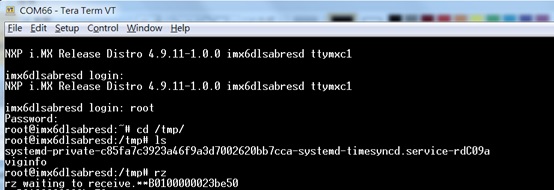
使用zmodem 傳輸檔案
(1)
輸入username / password
(2)
進入 /tmp folder : cd /tmp
(3)
開啟 Zmodem 接收: rz
(4)
使用Tera Term 進行 Zmodem 傳輸。
(5)
確認傳輸的檔案在tmp底下 : ls /tmp
(6)
下次再download 需要移除,已存在之檔案: rm post_utility


2018年5月27日 星期日
GPIO
https://blog.csdn.net/xnwyd/article/details/9042159
https://www.emcraft.com/som/vf6/controlling-gpio-from-linux
Now run the following shell commands to turn the LED on and off at a 1Hz frequency:
while echo hey; do echo 1 > gpio36/value; sleep 1; echo 0 > gpio36/value; sleep 1; done
https://www.emcraft.com/som/vf6/controlling-gpio-from-linux
Now run the following shell commands to turn the LED on and off at a 1Hz frequency:
while echo hey; do echo 1 > gpio36/value; sleep 1; echo 0 > gpio36/value; sleep 1; done
| LTE_LEDon | MX6_PAD_GPIO_1__GPIO_1_1 | md 20E0210 |
| LED1 | MX6_PAD_DISP0_DAT0__GPIO4_IO21 | md 20E00B0 |
| LED2 | MX6_PAD_GPIO_2__GPIO1_IO02 | md 20E0224 |
| LED3 | MX6_PAD_GPIO_4__GPIO1_IO04 | md 20E022C |
| LED4 | MX6_PAD_GPIO_5__GPIO1_IO05 | md 20E0230 |
| LED5 | MX6_PAD_EIM_D29__GPIO3_IO29 | md 20E0178 |
| LED6 | MX6_PAD_EIM_D16__GPIO3_IO16 | md 20E0144 |
| 全亮: mw 20A8000 200000 mw 209C000 36 mw 20A4000 20010000 全熄: mw 20A8000 00 mw 209C000 00 mw 20A4000 00 |
2018年1月9日 星期二
Ethtool
+-------+ +-------+ +-------+ +-------+ +-------+ +-------+
| | | | | | | | | | | |
|Host |<-- br="" nbsp="">|Ctrl | | FIFOs | | MAC | MII | PHY | |Xformer| | RJ-45 |
|uC +-->| +-->| +------>| +--->| +-->| |
| | | | | | | | | | | |
+-------+ +-------+ +-------+ +-------+ +-------+ +-------+
https://serverfault.com/questions/566229/ethtool-says-that-eth0-uses-mii-but-twisted-pair-is-used
| | | | | | | | | | | |
|Host |<-- br="" nbsp="">|Ctrl | | FIFOs | | MAC | MII | PHY | |Xformer| | RJ-45 |
|uC +-->| +-->| +------>| +--->| +-->| |
| | | | | | | | | | | |
+-------+ +-------+ +-------+ +-------+ +-------+ +-------+
https://serverfault.com/questions/566229/ethtool-says-that-eth0-uses-mii-but-twisted-pair-is-used
訂閱:
文章 (Atom)